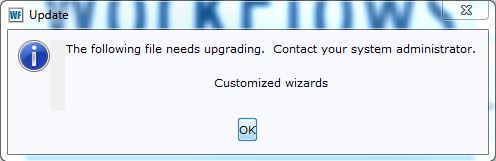
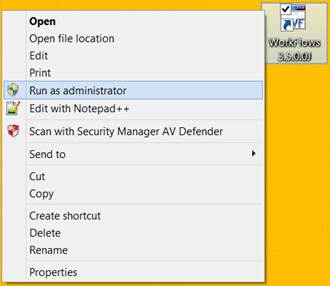
SWAN Member Libraries and Information Technology Staff: We've heard from several libraries that clicking "OK" does not always resolve this message for subsequent logins to WorkFlows. The reason for this is that the required patch files need to be downloaded and applied using administrator permissions. The easiest way to resolve this issue is to simply run WorkFlows as an administrator. This can be performed in the following steps... 1. Right click the WorkFlows icon on your desktop 2. Click the "Run as administrator" drop-down option [cid:image003.jpg@01D0EA54.ADB66A70] 3. Enter your computer's administrator password when prompted 4. When WorkFlows opens, login using any WorkFlows account 5. Click the "OK" when prompted with the Customized Wizards message Running this process a single time will resolve the prompt for all users on that desktop. There's no need to perform this action different Windows users. For IT departments having a high volume of workstations requiring the patch (instances where logging in as administrator may be unfeasible), please contact SWAN IT with a ticket (help@swanlibraries.net<mailto:help@swanlibraries.net>), as we have an alternate method for deploying the necessary patch files to multiple workstations. We apologize for the inconvenience and confusion over this prompt. We're not yet certain as to what server change initiated the patch, but any changes we perform requiring library administration interaction will always be pre-planned outside of emergency situations. Steven Schlewitt SWAN IT Manager 125 Tower Drive Burr Ridge, IL 60527 Phone: 630.734.5130 Fax: 630.734.5056 steven.schlewitt@railslibraries.info<mailto:steven.schlewitt@railslibraries.info> http://support.swanlibraries.net From: swancom-bounces@list.swanlibraries.net [mailto:swancom-bounces@list.swanlibraries.net] On Behalf Of Dave Pacin Sent: Tuesday, September 1, 2015 7:26 AM To: swancom@list.swanlibraries.net Subject: [SWANcom] Extra message in WorkFlows this morning You may see an extra pop-up message in WorkFlows this morning: [cid:image001.jpg@01D0EA52.3568C1A0] If you click "OK" WorkFlows should function as normal after that. Let us know if you have any issues getting WorkFlows to open. Thanks! Dave Pacin SWAN Support Specialist 125 Tower Drive Burr Ridge, IL 60527 Phone: 630.734.5151 Fax: 630.734.5056 dave.pacin@railslibraries.info<mailto:dave.pacin@railslibraries.info> http://support.swanlibraries.net